
One website – two different views
Customers and agents use the same website.
What your customers see and what you can see and do, depends on whether you are logged in.
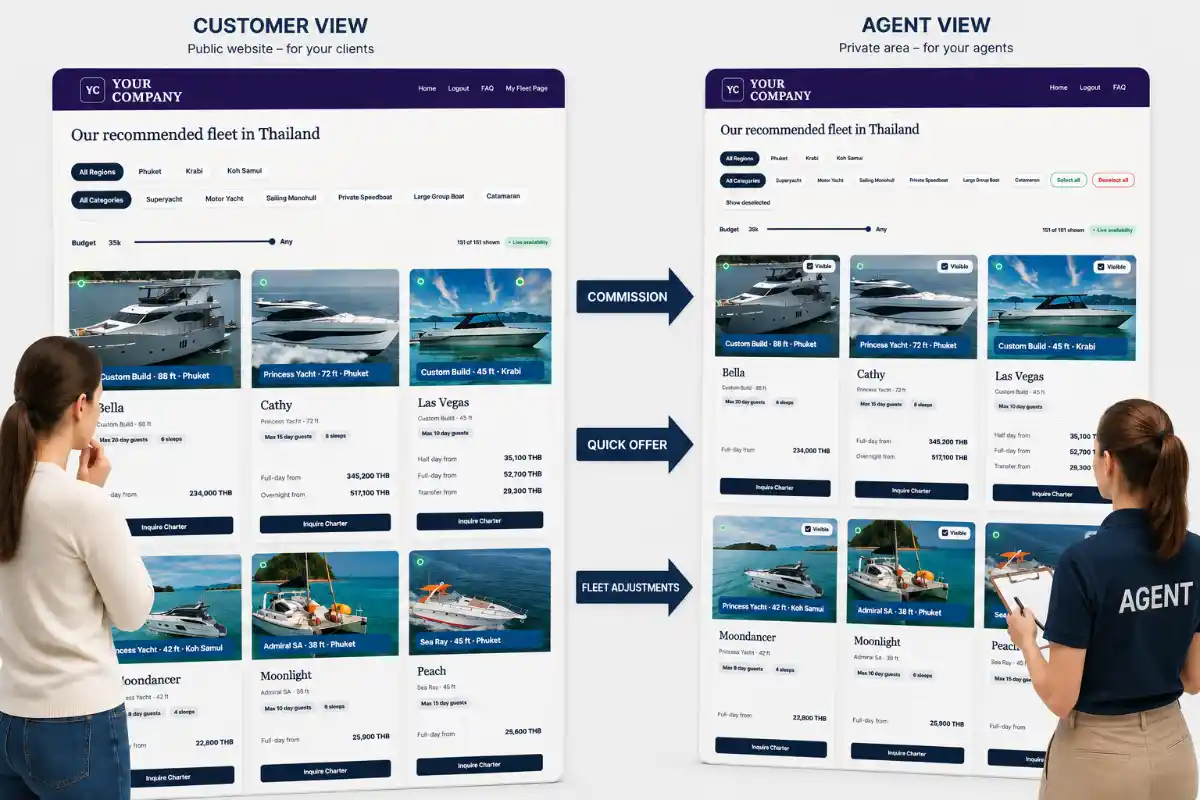
What does a visitor see?
Visitors (not logged in) can:
- Browse yachts, tours, pictures and included services.
- Select a date, tour and number of passengers.
- Add available extras and menu options.
- Calculate the final sale price.
- Send their selected tour and calculation to you, their agent, as a request via WhatsApp.
Visitors see only customer sale prices. They never see the agent’s commission.
What do you see when logged-in
As logged-in agent you use the same yacht pages and calculators, but additional agent tools are unlocked.
Agents can:
- See the commission included in the calculated sale price, based on their stored standard commission.
- Click Copy Quote to copy a completed offer.
- Send the copied offer through WhatsApp, LINE, email, Telegram or any other channel.
- Create a complete PDF quote with an individually adjusted commission.
- Increase the standard commission or reduce their commission to offer the customer a discount.
The customer still sees only the final sale price. Commission information is visible only to the logged-in agent.
Logged-in agents have 4 ways to create offers:
1. Send an PDF brochure
- Choose a yacht and download the PDF brochure.
- The brochure lists all available tour options with this yacht (your standard commission already included in the prices), menus and extras.
- Send the PDF brochure to your customer.
2. Create, copy and send a specific tour quote
- Open the required yacht and trip on the website.
- In the calculator, select the charter date and tour.
- Enter the number of passengers.
- Select any required add-ons and menu options.
- Check the calculated sale price.
- Click Copy Quote.
- Paste the copied offer into WhatsApp, email, Telegram or any other communication channel.
The copied quote uses your standard commission and contains the information the customer needs to review the offer.
You can change the price of the quote of course - but as you are sending a URL to the yacht, the customer is not only able to see the pictures, but also the original prices.
3. Create a complete specific PDF quote
If you like to send a complete, professionally formatted PDF quote to your customer, it contains all relevant information about the boat, the trip etc. The customer do not have to refer to the website for further information, and there is no URL given inside the PDF to do so.
This is the best opportunity to change the value of your commission as you wish.
- Open the required yacht and trip on the website.
- In the calculator, select the charter date and tour.
- Enter the number of passengers.
- Select any required add-ons and menu options.
- Change the calculated commission to your wished value
- Click PDF Quote and download the file, send it to your customer.
- The quote will show the resulting price which is calculated by the net price PLUS your entered commission.
- Your individual commission does certainly not change the net price to pay for booking the boat with Yacht Rental Thailand.
4. Quick Offer
For a quick overview of several suitable yacht options, click the Quick Offer button.
- Select the region.
- Select the requested date.
- Choose the tour type, such as Full Day, Half Day or Overnight.
- Enter the number of guests.
- Use the buttons below as usual to apply additional filters, such as yacht type and destination.
The fleet will then display only yachts that:
- are confirmed as available for the selected date, or
- do not have live availability data.
- Yachts that are confirmed as unavailable will be hidden.
A Select checkbox will appear on each yacht card. Use it to select the yachts you would like to include in the overview. Once you have made your selection, click Create Quick Offer.
The complete list—including yacht details, prices and links to your agent pages—will be copied to your clipboard. You can then paste it directly into WhatsApp, email or any other communication channel.
Important usage note
Yachts without live availability data must only be offered subject to confirmation. In the copied text, these yachts are marked as:
Already requested – need confirmation asap
This gives you some flexibility when speaking with the customer. If the yacht is not available at the time your customer want to book it, you can respond naturally:
'Oh, sorry—the yacht has just been booked. However, I have another suitable option available for you.'
Choose a yacht that suits the customer's number of passengers, preferred destination, budget and requirements. In the calculator, select the requested charter date and tour, enter the correct number of passengers, and choose any add-ons and menu options.
Check that the selected yacht, tour, duration, inclusions and calculated sale price match the customer's request. A displayed price does not guarantee availability.
Always confirm availability with Yacht Rental Thailand before accepting a deposit or confirming the booking.
Your standard commission is automatically used when you create an offer with Copy Quote. If you want to use a different commission, create a PDF quote. During the PDF quote process, enter the commission you want to use for that particular offer.
The adjusted commission affects the final sale price shown in the PDF. (In that case, better do not give your customer the URL, as he would be able to check the standard prices visible at your site and calculated with your standard commission.)
Your commission is visible only to you while you are logged in.
Commission is the amount included in the sale price that the agent earns for arranging the booking. A discount reduces the price paid by the customer.
Before offering a discount, check how it affects your commission and the final amount payable to Yacht Rental Thailand. If you are unsure, contact Yacht Rental Thailand before sending the offer.
No. Customers always see only the final sale price.
- Copy Quote uses your standard commission.
- A PDF quote uses the commission selected specifically for that quote.
- The customer's own calculator displays the applicable sale price.
Commission information is visible only to you while you are logged in.
As a logged-in agent, select the date and tour in the calculator, enter the number of passengers, and choose any add-ons and menu options. Click Copy Quote, then paste and send the copied offer through WhatsApp, email, Telegram or any other communication channel.
Alternatively, create and send a complete PDF quote if you want to adjust the commission or provide a formally formatted document.
Customers can use the same calculator themselves. After selecting their tour, date, passenger number and options, they can click the WhatsApp button to send Yacht Rental Thailand an enquiry for that specific calculation.
A sent offer cannot be edited. If the customer requests a different yacht, date, tour, passenger count, price or commission, create a new offer and send the updated copied quote or PDF. Make sure the customer understands that the new offer replaces the previous version.
- Contact Yacht Rental Thailand and verify that the yacht is available for the requested date and tour.
- Make sure the customer accepts the final offer and booking conditions.
- Receive the required 50% deposit.
- Inform Yacht Rental Thailand once the deposit has been received.
- Wait for the booking confirmation from Yacht Rental Thailand.
An offer alone does not reserve the yacht. The booking is confirmed only after availability has been checked, the required deposit has been received and Yacht Rental Thailand has confirmed the booking.
Always check the yacht's availability directly with Yacht Rental Thailand. Also verify the yacht, date, tour, duration, number of passengers, final price and any special requests.
Do not promise availability or treat an offer as a confirmed booking until Yacht Rental Thailand has confirmed it.
Contact Yacht Rental Thailand before sending or confirming the offer. Yacht Rental Thailand can verify the yacht's availability, price, tour details, inclusions, additional charges and special requests.